USB Host Function
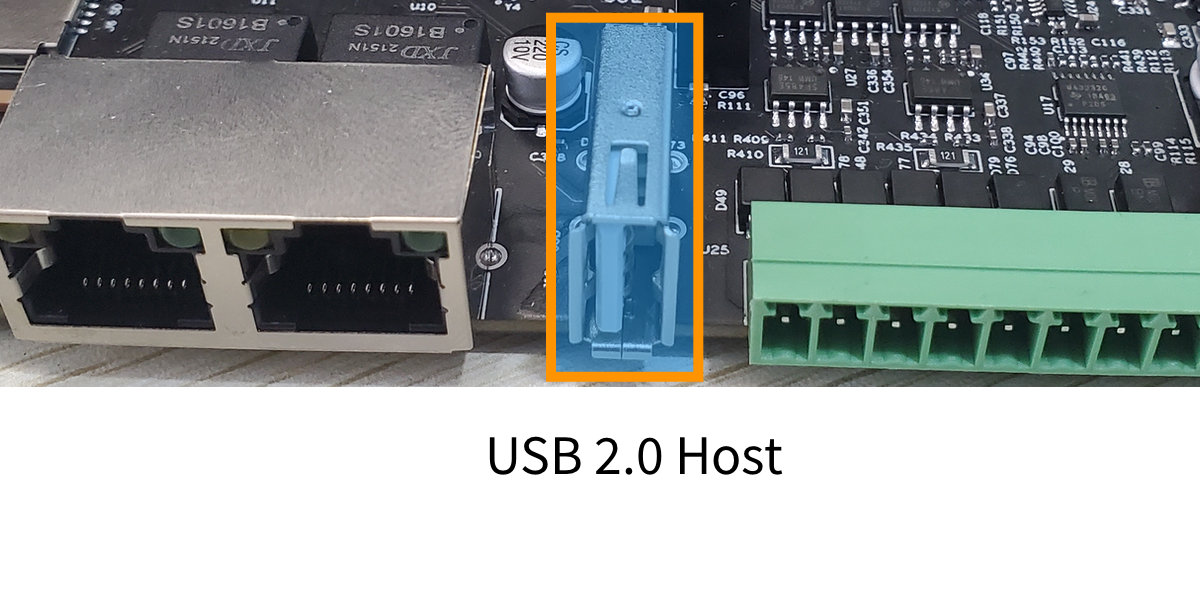
The GW102 gateway provides one USB HOST interface compliant with the USB 2.0 specification. The physical connector is a vertical standard USB-A receptacle. It can be used to connect USB flash drives, USB cameras, USB speakers, etc.
The physical interface is shown below:
How to Use a USB Flash Drive
After inserting the USB flash drive, the system prompts information indicating that new hardware has been detected.
usb 2-1.2: new high-speed USB device number 5 using ci_hdrc
usb-storage 2-1.2:1.0: USB Mass Storage device detected
scsi host0: usb-storage 2-1.2:1.0
scsi 0:0:0:0: Direct-Access              SD Card Reader   1.00 PQ: 0 ANSI: 6
sd 0:0:0:0: [sda] 30560256 512-byte logical blocks: (15.6 GB/14.6 GiB)
sd 0:0:0:0: [sda] Write Protect is off
sd 0:0:0:0: [sda] No Caching mode page found
sd 0:0:0:0: [sda] Assuming drive cache: write through
 sda: sda1
sd 0:0:0:0: [sda] Attached SCSI removable disk
If no prompt information is displayed, you can use the dmesg | tail command to check the latest part of the system information for information related to the USB device.
By default, the system automatically mounts USB devices and supports the FAT, VFAT, EXT2, EXT3, and EXT4 file system formats by default. Use the mount command to view the current system mount points.
root@gw102d512e4:~# mount
/dev/mmcblk1p3 on / type ext4 (rw,relatime,data=ordered)
devtmpfs on /dev type devtmpfs (rw,relatime,size=89392k,nr_inodes=22348,mode=755)
sysfs on /sys type sysfs (rw,nosuid,nodev,noexec,relatime)
proc on /proc type proc (rw,relatime)
securityfs on /sys/kernel/security type securityfs (rw,nosuid,nodev,noexec,relatime)
tmpfs on /dev/shm type tmpfs (rw,nosuid,nodev)
devpts on /dev/pts type devpts (rw,relatime,gid=5,mode=620,ptmxmode=000)
tmpfs on /run type tmpfs (rw,nosuid,nodev,mode=755)
tmpfs on /sys/fs/cgroup type tmpfs (ro,nosuid,nodev,noexec,mode=755)
cgroup2 on /sys/fs/cgroup/unified type cgroup2 (rw,nosuid,nodev,noexec,relatime,nsdelegate)
cgroup on /sys/fs/cgroup/systemd type cgroup (rw,nosuid,nodev,noexec,relatime,xattr,name=systemd)
cgroup on /sys/fs/cgroup/memory type cgroup (rw,nosuid,nodev,noexec,relatime,memory)
cgroup on /sys/fs/cgroup/devices type cgroup (rw,nosuid,nodev,noexec,relatime,devices)
cgroup on /sys/fs/cgroup/freezer type cgroup (rw,nosuid,nodev,noexec,relatime,freezer)
cgroup on /sys/fs/cgroup/pids type cgroup (rw,nosuid,nodev,noexec,relatime,pids)
mqueue on /dev/mqueue type mqueue (rw,relatime)
tmpfs on /tmp type tmpfs (rw,nosuid,nodev)
debugfs on /sys/kernel/debug type debugfs (rw,relatime)
configfs on /sys/kernel/config type configfs (rw,relatime)
fusectl on /sys/fs/fuse/connections type fusectl (rw,relatime)
tmpfs on /var/volatile type tmpfs (rw,relatime)
/dev/mmcblk1p4 on /run/media/mmcblk1p4 type ext4 (rw,relatime,data=ordered)
/dev/sda1 on /run/media/sda1 type vfat (rw,relatime,gid=6,fmask=0007,dmask=0007,allow_utime=0020,codepage=437,iocharset=iso8859-1,shortname=mixed,errors=remount-ro)
You can see that the last one is our USB flash drive device, mounted by default at the /run/media/sda1 directory. You can then operate in that directory to read from and write to the USB flash drive.