Key Functions
The GW102 gateway provides two buttons, with functions of RST system reset and USR user-defined respectively. The USR user-defined button allows users to customize related functions according to application-layer software. In addition, if the USR button is pressed and held while powering on or resetting the system, the system will boot from the Micro SD card. Users can boot the system via the SD card and update the Flash program.
The physical diagram of the buttons is as follows:
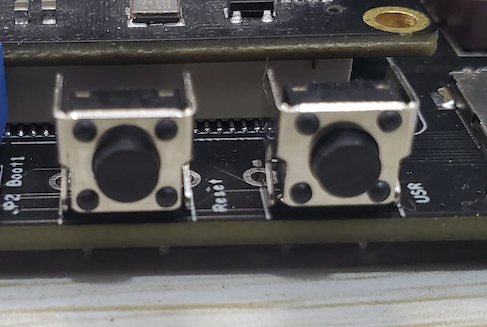
| PCB Silkscreen | Function Description |
|---|---|
| S1 | Reset, hardware reset button |
| S2 | USR, user-defined function |
Use the evtest command to test the USR button
root@gw102d512e4:~# evtest /dev/input/event1
Input driver version is 1.0.1
Input device ID: bus 0x19 vendor 0x1 product 0x1 version 0x100
Input device name: "gpio-keys"
Supported events:
  Event type 0 (EV_SYN)
  Event type 1 (EV_KEY)
    Event code 2 (KEY_1)
Properties:
Testing ... (interrupt to exit)
Event: time 1642542046.009682, type 1 (EV_KEY), code 2 (KEY_1), value 1
Event: time 1642542046.009682, -------------- SYN_REPORT ------------
Event: time 1642542046.179647, type 1 (EV_KEY), code 2 (KEY_1), value 0
Event: time 1642542046.179647, -------------- SYN_REPORT ------------
Event: time 1642542046.479690, type 1 (EV_KEY), code 2 (KEY_1), value 1
Event: time 1642542046.479690, -------------- SYN_REPORT ------------
Event: time 1642542046.519659, type 1 (EV_KEY), code 2 (KEY_1), value 0
Event: time 1642542046.519659, -------------- SYN_REPORT ------------
value 1 means pressed, value 0 means released.