MicroSD Interface
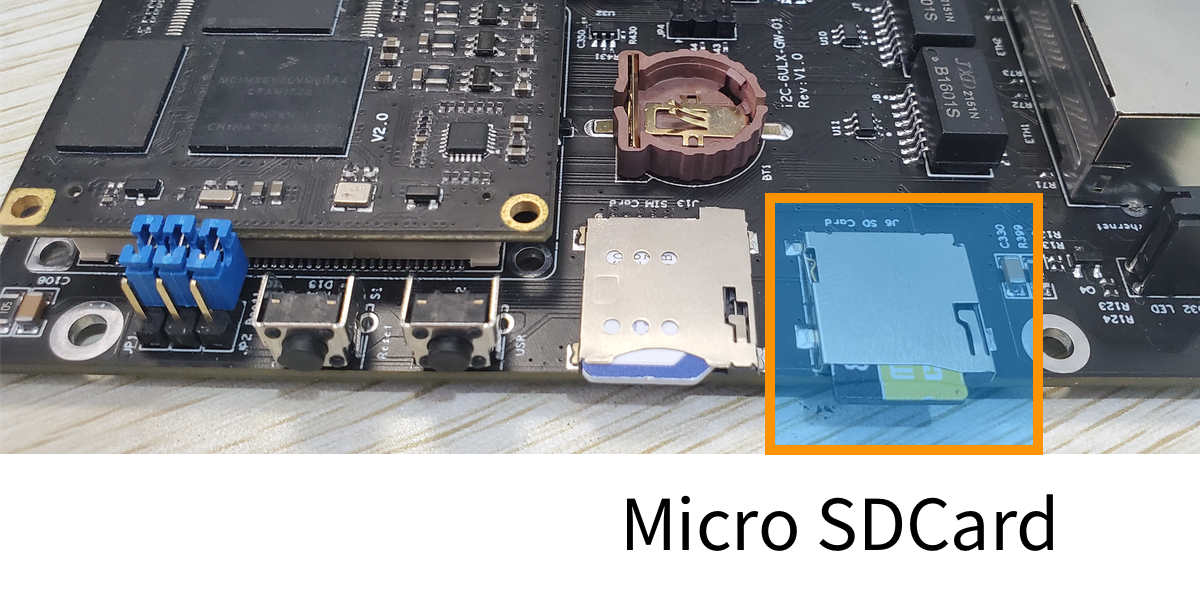
The GW102 gateway provides one Micro SD card interface on its side, using a standard MicroSD card socket, with PCB silkscreen J6 “SD Card”. The Micro SD card must be purchased separately by the developer and is not supplied with this product. The Micro SD card can be used for system debugging or system upgrade. After the system boot is complete, users can perform read and write operations on the SD card, allowing user data to be flexibly stored on the Micro SD storage card.
The actual product image is as follows:
How to use the Micro SD card
Insert the MicroSD card and press it until you hear a “click” from the spring latch, indicating that the card has been installed properly. At this point, the system will detect the card and output prompt information to the serial port.
mmc0: host does not support reading read-only switch, assuming write-enable
mmc0: new high speed SDHC card at address 59b4
mmcblk0: mmc0:59b4 SMI   7.44 GiB
 mmcblk0: p1
The system detects the card; the device name is mmcblk0 and it has one partition p1. Similarly, use the mount command to check whether it has been mounted.
root@gw102d512e4:~# mount | grep mmcblk0
/dev/mmcblk0p1 on /run/media/mmcblk0p1 type vfat (rw,relatime,gid=6,fmask=0007,dmask=0007,allow_utime=0020,codepage=437,iocharset=iso8859-1,shortname=mixed,errors=remount-ro)
Here the grep command is used to filter and only check whether the mmcblk0 device has been successfully mounted. The above information indicates that the mmcblk0p1 partition is mounted in the /run/media/mmcblk0p1 directory. Next, you can operate on this directory to read from and write to the MicroSD card.
After the operation is complete, use the umount command to unmount the directory.