4G Functionality
Function Overview
The side of the GW102 gateway provides one Micro SIM card interface, using a standard Micro SIM card socket. The marking on the enclosure is “Micro SIM”. When installing, the card notch faces outward and is on the right side of the enclosure opening. Users can choose SIM cards from different operators according to the type of built-in 4G module.
The GW102 gateway supports connection to 4G cellular networks. The antenna interface uses an SMA antenna connector (external thread, internal hole), located on the side of the gateway, with the silkscreen name 4G.
The actual 4G antenna is shown below:
The side of the GW102 gateway provides one Micro SIM card interface, using a standard Micro SIM card socket. The silkscreen on the enclosure is “SIM Card”. Users can choose SIM cards from different operators according to the type of built-in 4G module.
The actual 4G SIM card is shown below:
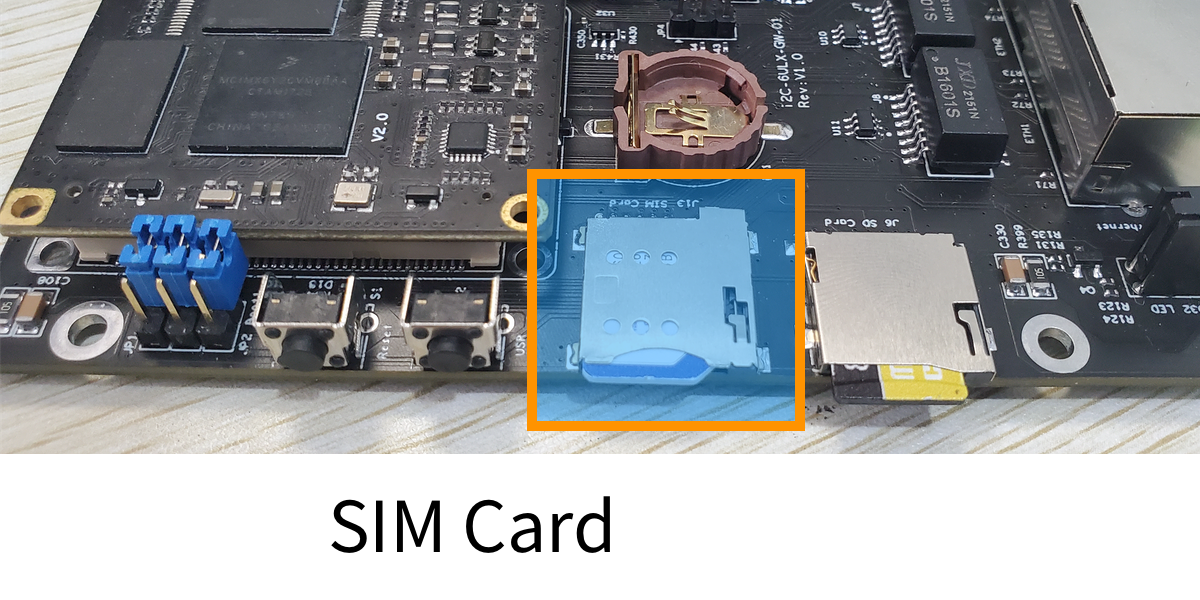
Before using the 4G network, you must first insert a Micro SIM card and ensure that network data service has been activated. When installing, the card notch faces outward, the chip faces down, and the notch is on the right side of the enclosure opening.
The GW102 gateway supports installing 4G modules with a Mini-PCIE interface. The built-in embedded Linux system already supports drivers for most 4G modules on the market, and they can be used directly after installation.
4G Bands in Various Regions
The 4G frequencies and bands are: 1880-1900MHz, 2320-2370MHz, 2575-2635MHz.
Mainland China has 3 major operators (excluding virtual operators), namely: China Mobile, China Unicom, China Telecom. There are 6 LTE bands, namely: Band 1, Band 3, Band 5, Band 39, Band 40, Band 41.
Hong Kong, China has 4 major operators (excluding virtual operators), namely: China Mobile (Hong Kong), HKT (PCCW), Hutchison Whampoa, Smartone. There are 4 LTE bands, namely: Band 3, Band 7, Band 8, Band 40.
The United States has 7 major operators (excluding virtual operators), namely: AT&T, T-Mobile, Sprint, Verizon, U.S. Cellular, C Spire Wireless, Shenandoah Telecommunications (Shentel). There are 14 LTE bands, namely: Band 2, Band 4, Band 5, Band 12, Band 13, Band 14, Band 17, Band 25, Band 26, Band 29, Band 30, Band 41, Band 66, Band 71.
The United Kingdom has 4 major operators (excluding virtual operators), namely: Vodafone_UK, BT (including EE), Hutchison 3G UK (Three UK), O2. There are 5 LTE bands, namely: Band 1, Band 3, Band 7, Band 20, Band 38
Japan has 3 major operators (excluding virtual operators), namely: KDDI, NTT DoCoMo, SoftBank. There are 12 LTE bands, namely: Band 1, Band 3, Band 8, Band 9, Band 11, Band 18, Band 19, Band 21, Band 26, Band 28, Band 41, Band 42.
India has 7 major operators (excluding virtual operators), namely: Bharat Sanchar Nigam Limited (BSNL), Bharti Airtel, Mahanagar Telephone Nigam Limited (MTNL), Reliance Communications (RCOM), Reliance Jio Infocomm (Jio), Tata Teleservices, Vodafone Idea. There are 6 LTE bands, namely: Band 1, Band 3, Band 5, Band 8, Band 40, Band 41.
Canada has 10 major operators (excluding virtual operators), namely: Bell Mobility/BCE, Fido Solutions, Rogers Wireless, Telus, Vidéotron, Freedom Mobile, Bell MTS, Eastlink, Ice Wireless, SaskTel. There are 9 LTE bands, namely: Band 2, Band 4, Band 5, Band 7, Band 12, Band 17, Band 29, Band 42, Band 66.
Brazil has 6 major operators (excluding virtual operators), namely: Claro, Nextel, Oi, Telefônica Brasil, Algar Telecom, TIM Brasil. There are 4 LTE bands, namely: Band 1, Band 3, Band 7, Band 28.
Australia has 3 major operators (excluding virtual operators), namely: Optus, Telstra, Vodafone. There are 7 LTE bands, namely: Band 1, Band 3, Band 5, Band 7, Band 8, Band 28, Band 40
South Korea has 3 major operators (excluding virtual operators), namely: SK Telecom, KT, LG UPlus. There are 5 LTE bands, namely: Band 1, Band 3, Band 5, Band 7, Band 8
Hong Kong: FDD-LTE, B3, B7 China Mobile: TD-LTE, B39, B40, B41 China Unicom: FDD-LTE, B1, B3, B40, B41 China Telecom: FDD-LTE, B1, B3, B5, B40, B41
5G Bands in Various Regions
The 5G frequencies and bands: 3300-3400MHz (in principle limited to indoor use), 3400-3600MHz and 4800-5000MHz
Countries and Regions Supported by the 4G Global Band Version
North America
- LTE-FDD: 2, 4, 5, 7, 12, 13, 17, 29, 33, 66
- LTE-TDD: 41
US operators: AT&T: B2, B4, B5, B12, B17 Verizon: B2, B4, B13 T-Mobile: B2, B4. B12 Sprint: B25, B26. B41
Canadian operators: Rogers: B2, B4, B5, B7, B12, B17 Bell: B4, B7 Telus: B4
South America
- LTE-FDD: 2, 3, 4, 5, 7, 28
Countries: Argentina, Brazil, Chile
Europe
- LTE-FDD: B1, B3, B7, B8, B20, B28
- LTE-TDD: B38
Asia
LTE-FDD: B1, B3, B5, B6, B7, B8, B28 LTE-TDD: B38, B39, B40, B41
Japanese operators: NTT DoCoMo: B1, B3, B19, B21 Softbank: B1, B3, B8, B41 KDDI: B1, B11, B18, B26, B28, B41
Taiwan operators: APT: B3, B8, B28 Chunghwa Telecom: B3, B7, B8 FarEas Tone: B3, B6, B28 Taiwan Mobile: B3, B28 TSTAR: B7, B8
South Korean operators: SKT: B3, B5 KT: B3, B8 LGU+: B5, B7
Russian operators: VimpelCom: B7, B20 MTS, MegaFon: B7, B20, B38 Rostelcom: B40 Vainakh Telecom: B40
South Africa
- LTE-FDD: B1, B3, B7, B8, B20, B28
- LTE-TDD: B38, B40
If the above bands are not available in your country or region, please contact technical support for more detailed information.
The current system already supports drivers for the following 4G module models
| Model | USB VID/PID | Manufacturer | Communication Method | Installation Method | Speed | | ---- | | EC20CFD-512-STD | 2c7c:0125 | Quectel | USB | Mini PCIe | CAT.4 | | EC200S-CN | 2c7c:6002 | Quectel | USB | Mini PCIe | CAT.1 | | L610-CN-00-MiniPCIe-10-00 | 1782:4d11 | Fibocom | USB | Mini PCIe | CAT.1 | | Luat Air724UG | 1782:4e00 | Luat | USB | Mini PCIe | CAT.1 |
After the above module models are inserted into the USB Host interface or connected to the USB signal lines, the system recognizes the module, and the corresponding serial port or network device appears.
The GW102 gateway product is equipped with a Fibocom L610 or EC200M 4G module by default.
Due to market fluctuations, products configured with a 4G module may be randomly equipped with modules from different manufacturers or of different models. If you need a specified manufacturer/model, please contact technical support in a timely manner.
ltetool -dev gw102 -lte GM196 -c
Fibocom L610-CN Before powering on the GW102 gateway, please check again whether the 4G module is installed correctly and whether the SIM card is inserted in the correct direction.
After entering the system, execute the following command to connect to the 4G network
ltetool -c
Disconnect from the 4G network
ltetool -d
Quectel EC20 Series Modules
On the PanGu development board, the EC20 module uses QMI for dialing, which can achieve better network speed.
After connection, enter the system. Using lsusb, you can see that the USB device has been recognized, and there are USB serial ports under /dev. Using ifconfig, you can see the wwan0 device, indicating that the QMI driver is also recognized correctly.
root@pangu:~# lsusb
Bus 002 Device 001: ID 1d6b:0002 Linux Foundation 2.0 root hub
Bus 001 Device 003: ID 2c7c:0125 Quectel Wireless Solutions Co., Ltd. EC25 LTE modem
Bus 001 Device 002: ID 0424:2514 Standard Microsystems Corp. USB 2.0 Hub
Bus 001 Device 001: ID 1d6b:0002 Linux Foundation 2.0 root hub
root@pangu:~# ls /dev/ttyUSB*
/dev/ttyUSB0  /dev/ttyUSB1  /dev/ttyUSB2  /dev/ttyUSB3
root@pangu:~# ifconfig wwan0
wwan0     Link encap:Ethernet  HWaddr 26:A4:EA:8D:C1:2B
          BROADCAST NOARP MULTICAST  MTU:1500  Metric:1
          RX packets:0 errors:0 dropped:0 overruns:0 frame:0
          TX packets:0 errors:0 dropped:0 overruns:0 carrier:0
          collisions:0 txqueuelen:1000
          RX bytes:0 (0.0 B)  TX bytes:0 (0.0 B)
Then you can use the quectel-CM command to connect to the network. After connection, you can see that the network IP address and gateway address have been obtained.
root@pangu:~# quectel-CM
[11-09_10:18:26:772] WCDMA<E_QConnectManager_Linux&Android_V1.1.34
[11-09_10:18:26:772] quectel-CM profile[1] = (null)/(null)/(null)/0, pincode = (null)
[11-09_10:18:26:774] Find /sys/bus/usb/devices/1-1.2 idVendor=2c7c idProduct=0125
[11-09_10:18:26:774] Find /sys/bus/usb/devices/1-1.2:1.4/net/wwan0
[11-09_10:18:26:774] Find usbnet_adapter = wwan0
[11-09_10:18:26:775] Find /sys/bus/usb/devices/1-1.2:1.4/usbmisc/cdc-wdm0
[11-09_10:18:26:775] Find qmichannel = /dev/cdc-wdm0
[11-09_10:18:26:805] cdc_wdm_fd = 7
[11-09_10:18:26:899] Get clientWDS = 19
[11-09_10:18:26:931] Get clientDMS = 1
[11-09_10:18:26:963] Get clientNAS = 3
[11-09_10:18:26:995] Get clientUIM = 1
[11-09_10:18:27:027] Get clientWDA = 1
[11-09_10:18:27:059] requestBaseBandVersion EC20CFDR02A08M4G  1  [Nov 30 2016 04:00:00]
[11-09_10:18:27:155] requestGetSIMStatus SIMStatus: SIM_READY
[11-09_10:18:27:187] requestGetProfile[1] 3gnet///0
[11-09_10:18:27:219] requestRegistrationState2 MCC: 460, MNC: 11, PS: Attached, DataCap: LTE
[11-09_10:18:27:251] requestQueryDataCall IPv4ConnectionStatus: DISCONNECTED
[11-09_10:18:27:315] requestRegistrationState2 MCC: 460, MNC: 11, PS: Attached, DataCap: LTE
[11-09_10:18:27:347] requestSetupDataCall WdsConnectionIPv4Handle: 0x8793db10
[11-09_10:18:27:411] requestQueryDataCall IPv4ConnectionStatus: CONNECTED
[11-09_10:18:27:444] ifconfig wwan0 up
[11-09_10:18:27:476] busybox udhcpc -f -n -q -t 5 -i wwan0
udhcpc: started, v1.29.2
udhcpc: sending discover
udhcpc: sending select for 10.63.239.243
udhcpc: lease of 10.63.239.243 obtained, lease time 7200
[11-09_10:18:27:951] /etc/udhcpc.d/50default: Adding DNS 61.134.1.6
[11-09_10:18:27:951] /etc/udhcpc.d/50default: Adding DNS 218.30.19.40
Network speed test
root@gw102:~# speedtest

   Speedtest by Ookla

[error] Error: [0] Cannot read from socket:
     Server: Lanzhou,China Mobile,Gansu - Lanzhou (id = 16145)
        ISP: China Telecom
    Latency:    46.69 ms   (1.29 ms jitter)
   Download:     9.05 Mbps (data used: 11.6 MB)
     Upload:     4.73 Mbps (data used: 2.3 MB)
Packet Loss: Not available.
 Result URL: https://www.speedtest.net/result/c/087f1b3b-deaf-48dc-8ace-d84fd6164eff