Debug Serial Port
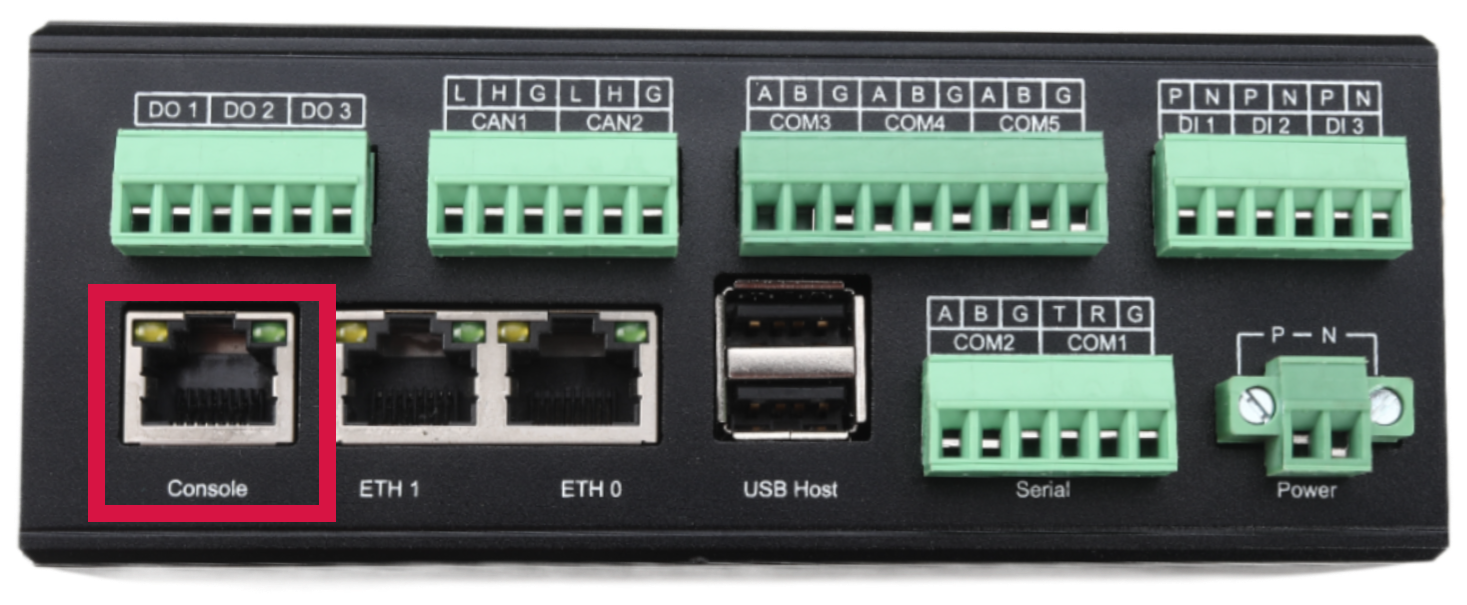
The GW101 gateway provides one RS232 debug serial port with an RJ45 connector, which can be used as a Linux terminal to debug the system. The debug serial port uses the UART0 controller. There are two LED indicators on the serial port connector. A flashing yellow LED indicates that the device is receiving data, and a flashing green LED indicates that the device is sending data normally. The debug serial port uses an RJ45 connector. Users can use it with the included USB-to-serial cable. Reference link for the USB Console cable: https://item.jd.com/46217340735.html The actual interface is shown in the figure below:
RJ45 debug serial port hardware definition
| Pin Number |
| 1 |
| 2 |
| 3 |
| 4 |
| 5 |
| 6 |
| 7 |
| 8 |
Connection Method
Hardware Connection Instructions
Use the USB console debug cable. Connect the RJ45 end to the interface silkscreened as Console, and connect the other end to the USB port of the computer. After the hardware is connected, serial port software needs to be configured before the Console function can be used. Different serial port debugging software can be used on different systems.
Windows System Users
The serial port tool uses Xshell Education Edition. Configure it according to the serial communication parameters above.
Linux System Users
The serial port tool uses c-kermit. On Ubuntu/Debian systems, use the apt-get or aptitude command to install it.
sudo apt-get install ckermit
The contents of the configuration file kermrc are as follows
set line /dev/ttyUSB0
set speed 115200
set parity none
set carrier-watch off
set handshake none
set flow-control none
robust
set file type bin
set file name lit
set rec pack 1000
set send pack 1000
set window 5
Mac OS System Users
The serial port tool uses c-kermit. Use the brew command to install it.
brew install c-kermit
The contents of the configuration file kermrc are as follows
set line /dev/cu.xrusbmodem1a1211
set speed 115200
set parity none
set carrier-watch off
set handshake none
set flow-control none
robust
set file type bin
set file name lit
set rec pack 1000
set send pack 1000
set window 5
After the power is connected, the gateway starts to power on and boot, and the boot information can be seen from the serial port software.